Setting Up Your Account
Home > Processing Payroll > Payroll Tax Forms > Electronic Form Filing > Setting Up Your Account
Setting Up Your Account
Before you can transmit files, you must first setup an account with the third party service. In the Efile Account Setup screen, Brass Jacks Bookkeeper will pull information from your company setup data to fill in as much information as possible. The company name and address MUST be filled in as part of the company setup data. Contact name, phone and email will be pre-populated if it is setup in the company screen but if not you can enter it here.
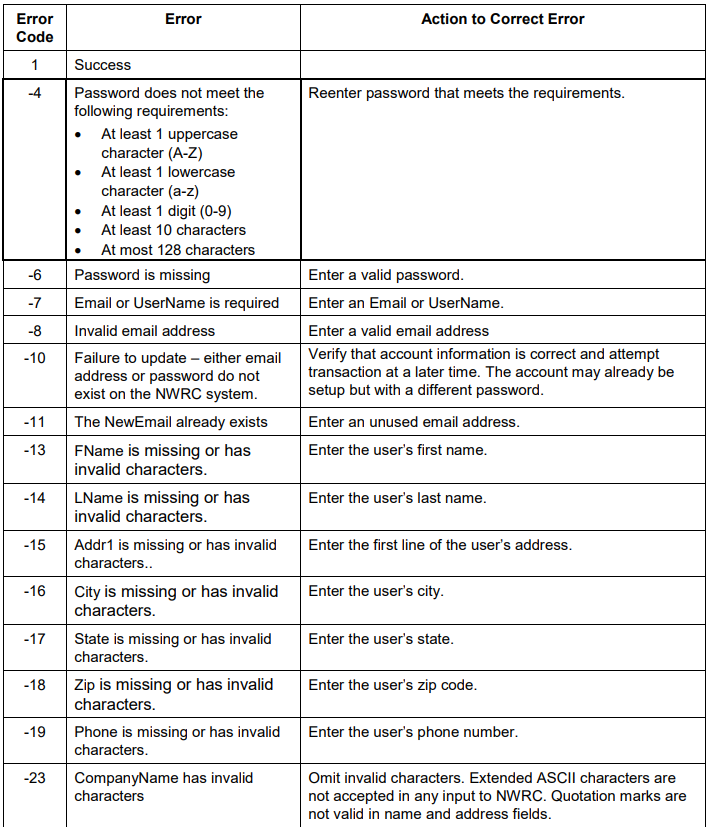
Once all fields have been filled in, click the Connect button which will validate all the information entered and, if successful, setup your account with the third party service.You will receive a confirmation popup if the account is setup successfully.
Keep the password in a secure, safe location. Your credentials are retained in Brass Jacks Bookkeeper so you do not have to enter them when transmitting files.
When your account is setup successfully, click the Save & Close button to save your accout setup information to the database and close this window.
Note: if you use manage multi companies in Brass Jacks Bookkeeper, each company needs to have a unique email address when setting up the account with the third party services.
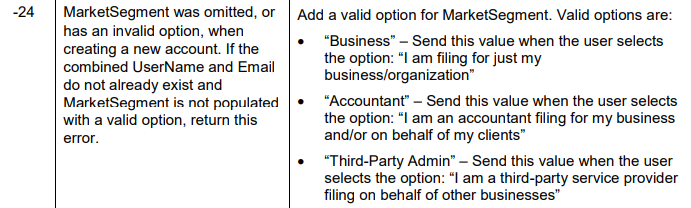
Error Messages