Exploring the Brass Jacks Bookkeeper Workspace
Home > Getting Started > Exploring the Brass Jacks Bookkeeper Workspace
Exploring the Brass Jacks Bookkeeper Workspace
The Brass Jacks Bookkeeper workspace consists of two sections and a menu bar. The window's title bar shows that name of the active company file. You always have a company file active when Brass Jacks Bookkeeper is open.
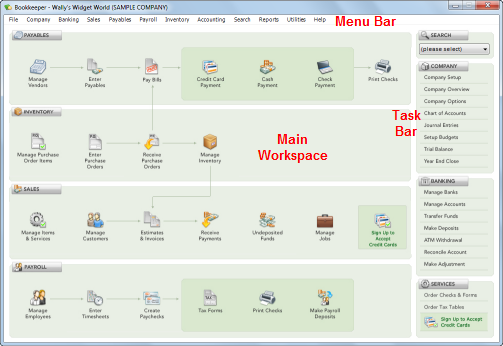
You can use the menu commands, workspace icons, or task bar buttons to perform Brass Jacks Bookkeeper functions.
The main workspace shows icons for common tasks for four functional areas: Payables, Inventory, Sales, and Payroll. You can click these icons (instead of using the relevant menu commands) to quickly open dialog boxes for performing the tasks.
The task bar on the right provides quick access to company- and banking-related information. Click a button to view or change information. At the top of the task bar, you can search for various types of transactions. At the bottom of the task bar, you can order supplies, order tax tables, or sign up to process credit cards.
If the Workflow Coach is active, the Workflow Coach pane covers the task bar on the right until you close the Workflow Coach pane. For information about the Workflow Coach, see Using the Workflow Coach.